> For the complete documentation index, see [llms.txt](https://docs.tlic.cmu.ac.th/cmu-mango-canvas-manual/llms.txt). Markdown versions of documentation pages are available by appending `.md` to page URLs; this page is available as [Markdown](https://docs.tlic.cmu.ac.th/cmu-mango-canvas-manual/quizzes-and-assignment/new-quizzes/ordering.md).
# Ordering
In this type of question, students are required to arrange the answers in the correct order to receive full marks. However, partial credit for this type of question is not available at the moment.
### Adding Question
\[1] Question Title (invisible to students)
\[2] Question Stem
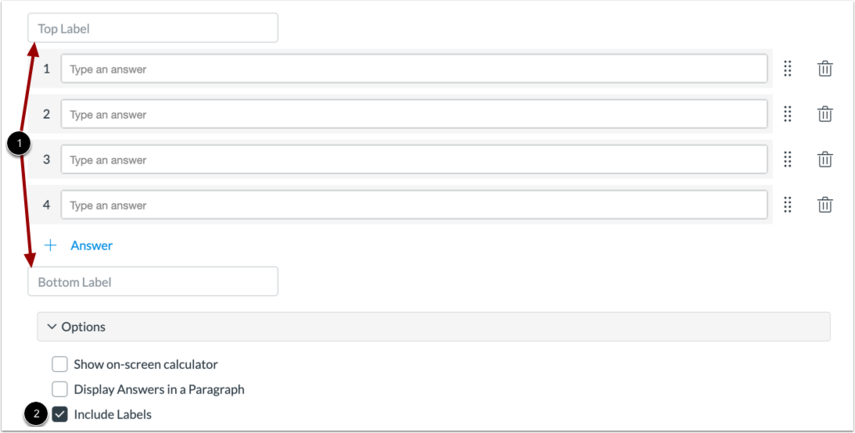
### Adding Label
Add a label at \[1] or remove it by unchecking the \[2] option.
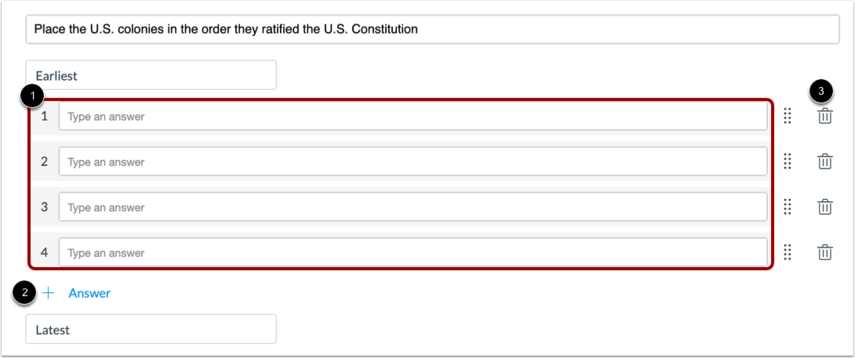
### Adding Answers
\[1] All answers
\[2] Add an answer
\[3] Delete the answer
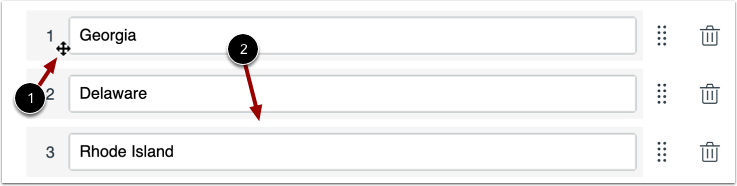
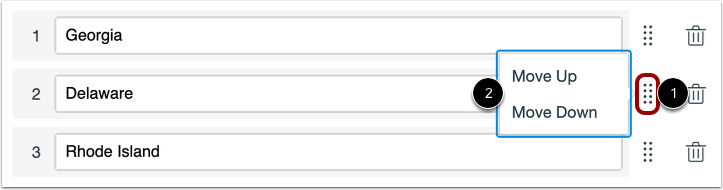
### Moving the Answers
You can move the answer by clicking and dragging the option to the desired position.
or you can click \[1] and select the desired movement option \[2].
## Video Tutorial for Ordering
{% embed url="" %}