> For the complete documentation index, see [llms.txt](https://docs.tlic.cmu.ac.th/cmucanvas-manual/llms.txt). Markdown versions of documentation pages are available by appending `.md` to page URLs; this page is available as [Markdown](https://docs.tlic.cmu.ac.th/cmucanvas-manual/quiz-assign/new-quizzes/matching.md).
# Matching
ข้อคำถามประเภทจับคู่ โดยผู้เรียนจะต้องเลือกคำตอบที่ถูกต้องจากในเมนู Drop-down ข้อคำถามประเภทนี้สามารถตั้งค่าคะแนนตามสัดส่วนคำตอบที่ถูกต้องได้ หรือผู้เรียนจะต้องตอบให้ถูกทั้งหมดจึงจะได้คะแนนก็ได้เช่นกัน
## เพิ่มคำถามและคู่คำตอบ
 \[1] ส่วนใส่คำถาม
\[2] ส่วนใส่คำตอบ
\[3] ส่วนเพิ่มคำถาม / คู่คำตอบ
\[4] ปุ่มสำหรับลบคำถาม / คู่คำตอบ
\[5] สามารถสลับคำถามได้ โดยเลือกที่ช่องนี้
\[1] ส่วนใส่คำถาม
\[2] ส่วนใส่คำตอบ
\[3] ส่วนเพิ่มคำถาม / คู่คำตอบ
\[4] ปุ่มสำหรับลบคำถาม / คู่คำตอบ
\[5] สามารถสลับคำถามได้ โดยเลือกที่ช่องนี้
 เพิ่มตัวเลือกลวงได้ที่ \[1] พิมพ์คำตอบลวงที่ \[2] หรือลบที่ \[3]
## ตั้งค่าการให้คะแนน
เพิ่มตัวเลือกลวงได้ที่ \[1] พิมพ์คำตอบลวงที่ \[2] หรือลบที่ \[3]
## ตั้งค่าการให้คะแนน
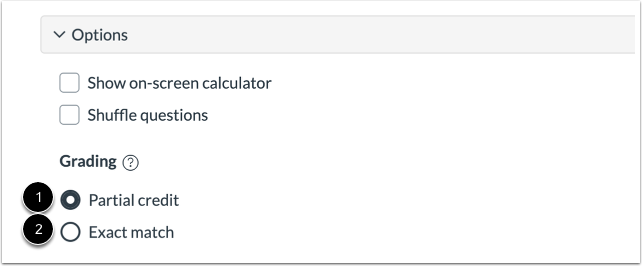 \[1] ให้คะแนนในส่วนที่ตอบถูกตามสัดส่วน คะแนนน้อยที่สุดที่เป็นไปได้คือ 0
ตัวอย่าง คำถามข้อนี้มีคะแนน 4 คะแนน มีคำตอบที่ถูกต้อง 2 คำตอบ ระบบจะแบ่งคำตอบที่ถูกต้องเป็นข้อละ 2 คะแนนให้โดยอัตโนมัติ ผู้เรียนตอบผิด 1 ข้อ ถูก 1 ข้อ จะได้รับคะแนนทั้งหมด 2 คะแนน
\[2] ผู้เรียนต้องตอบถูกทั้งหมดเท่านั้นจึงจะได้รับคะแนน
## คลิปสาธิตการสร้างคำถามประเภท Matching
{% embed url="" %}
\[1] ให้คะแนนในส่วนที่ตอบถูกตามสัดส่วน คะแนนน้อยที่สุดที่เป็นไปได้คือ 0
ตัวอย่าง คำถามข้อนี้มีคะแนน 4 คะแนน มีคำตอบที่ถูกต้อง 2 คำตอบ ระบบจะแบ่งคำตอบที่ถูกต้องเป็นข้อละ 2 คะแนนให้โดยอัตโนมัติ ผู้เรียนตอบผิด 1 ข้อ ถูก 1 ข้อ จะได้รับคะแนนทั้งหมด 2 คะแนน
\[2] ผู้เรียนต้องตอบถูกทั้งหมดเท่านั้นจึงจะได้รับคะแนน
## คลิปสาธิตการสร้างคำถามประเภท Matching
{% embed url="" %}