> For the complete documentation index, see [llms.txt](https://docs.tlic.cmu.ac.th/cmucanvas-manual/llms.txt). Markdown versions of documentation pages are available by appending `.md` to page URLs; this page is available as [Markdown](https://docs.tlic.cmu.ac.th/cmucanvas-manual/quiz-assign/new-quizzes/multiple-choice-new-quizzes.md).
# Multiple Choice(New Quizzes)
ข้อคำถามแบบหลายตัวเลือก และมีคำตอบที่ถูกต้องที่สุดเพียงข้อเดียว
## เพิ่มคำถาม
 \[1] หัวข้อ ส่วนนี้ผู้เรียนจะไม่เห็น
\[2] ข้อคำถาม
## เพิ่มคำตอบ
\[1] หัวข้อ ส่วนนี้ผู้เรียนจะไม่เห็น
\[2] ข้อคำถาม
## เพิ่มคำตอบ
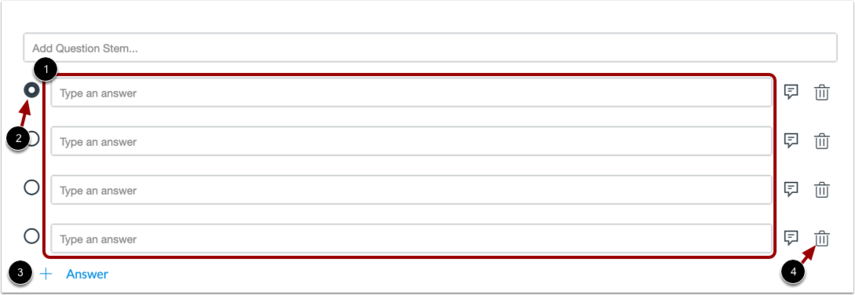 \[1] ส่วนเพิ่มตัวเลือก
\[2] ส่วนเลือกคำตอบที่ถูกต้อง
\[3] สำหรับเพิ่มตัวเลือก
\[4] สำหรับลบตัวเลือกที่ไม่ต้องการออก
## แต่ละตัวเลือกให้คะแนนต่างกันได้
\[1] ส่วนเพิ่มตัวเลือก
\[2] ส่วนเลือกคำตอบที่ถูกต้อง
\[3] สำหรับเพิ่มตัวเลือก
\[4] สำหรับลบตัวเลือกที่ไม่ต้องการออก
## แต่ละตัวเลือกให้คะแนนต่างกันได้
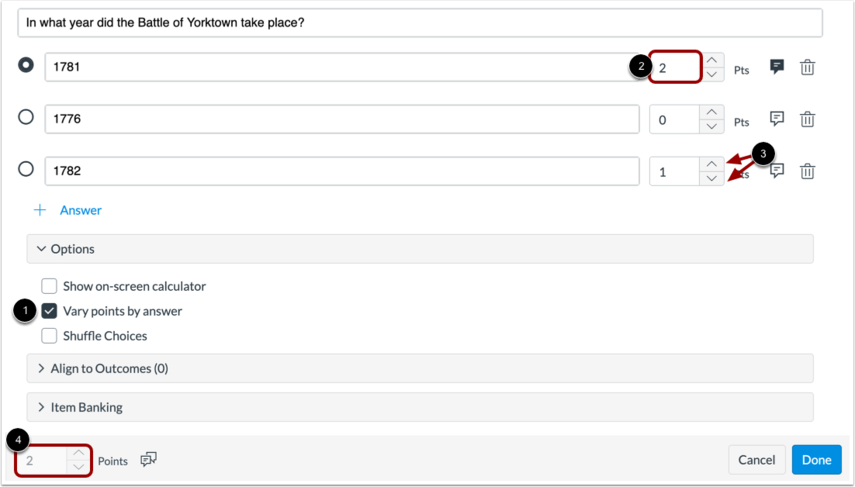 เลือกที่ \[1] เพื่อให้คำถามข้อนี้มีคะแนนที่ไม่เท่ากันในแต่ละตัวเลือกคำตอบ
ใส่คะแนนที่ต้องการที่ \[2] หรือใช้ปุ่มลูกศรเพื่อเพิ่ม/ลดคะแนน \[3]
เมื่อเลือกใช้ options นี้ คะแนนที่ปรากฏใน \[4] จะเป็นคะแนนสูงสุดที่เป็นไปได้ในคำถามข้อนี้
## Shuffle ตัวเลือก
เลือกที่ \[1] เพื่อให้คำถามข้อนี้มีคะแนนที่ไม่เท่ากันในแต่ละตัวเลือกคำตอบ
ใส่คะแนนที่ต้องการที่ \[2] หรือใช้ปุ่มลูกศรเพื่อเพิ่ม/ลดคะแนน \[3]
เมื่อเลือกใช้ options นี้ คะแนนที่ปรากฏใน \[4] จะเป็นคะแนนสูงสุดที่เป็นไปได้ในคำถามข้อนี้
## Shuffle ตัวเลือก
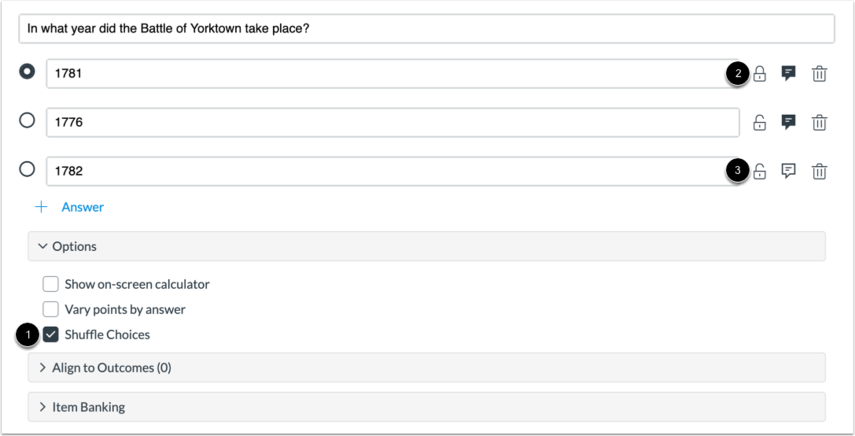 \[1] คลิกเลือกเมื่อต้องการให้ระบบสลับตัวเลือกให้
\[2] ปุ่มล็อคตัวเลือก เพื่อไม่ให้ตัวเลือกนั้นถูกสลับจากการ Shuffle
\[3] กดเมื่อต้องการปลดล็อค
## คลิปสาธิตการสร้างคำถามประเภท Multiple Choice
{% embed url="" %}
\[1] คลิกเลือกเมื่อต้องการให้ระบบสลับตัวเลือกให้
\[2] ปุ่มล็อคตัวเลือก เพื่อไม่ให้ตัวเลือกนั้นถูกสลับจากการ Shuffle
\[3] กดเมื่อต้องการปลดล็อค
## คลิปสาธิตการสร้างคำถามประเภท Multiple Choice
{% embed url="" %}